
Article Guide
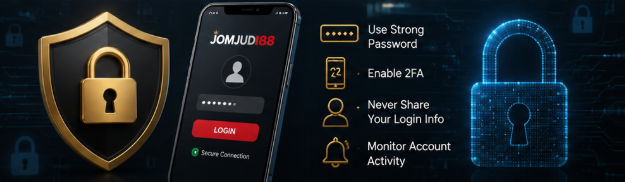
How to Keep Your JOMJUDI88 Account Secure
Practical steps to protect your JOMJUDI88 account, including stronger passwords, safer login habits, verification checks and ways to recognize suspicious activity.
Keeping an online account secure starts with a few simple habits. A strong password, careful login behaviour and regular account checks can reduce the risk of unauthorized access.
<br>
<br>Use a Strong and Unique Password
<br>
<br>Create a password that is different from passwords used for email, social media or other websites. A longer password that combines letters, numbers and symbols is generally harder to guess.
<br>
<br>Avoid using names, birthdays, phone numbers or simple combinations such as 123456. If you manage many online accounts, consider using a reputable password manager to keep your login details organized.
<br>
<br>Keep Your Login Details Private
<br>
<br>Never share your password, verification code or login information with another person. Legitimate support staff should not need your password in order to assist you.
<br>
<br>Be cautious if someone contacts you unexpectedly and asks for account credentials, verification codes or personal information.
<br>
<br>Check the Website Before Logging In
<br>
<br>Before entering your username or password, confirm that you are using the correct JOMJUDI88 website address. Look carefully at the domain name and make sure the connection uses HTTPS.
<br>
<br>Avoid logging in through unfamiliar links received through messages, social media posts or unsolicited emails.
<br>
<br>Recognize Suspicious Activity
<br>
<br>Unexpected password reset messages, unfamiliar account activity or login notifications may be signs that someone is attempting to access your account.
<br>
<br>If you notice anything unusual, change your password promptly and contact the official support channel.
<br>
<br>Use Verification Features When Available
<br>
<br>If your account offers additional verification or security checks, enable them when possible. Extra verification can add another layer of protection when signing in or making important account changes.
<br>
<br>Use only verification methods provided through the official website or official support channels.
<br>
<br>Avoid Public or Shared Devices
<br>
<br>Public computers and shared devices may store browsing information or login details. Whenever possible, access your account from a trusted personal device.
<br>
<br>If you must use a shared device, avoid saving your password and make sure you sign out completely when finished.
<br>
<br>Keep Your Device Secure
<br>
<br>Account protection also depends on the security of your phone or computer. Keep your operating system and browser updated, use a screen lock and avoid installing unknown applications or browser extensions.
<br>
<br>Regular updates help fix known security problems that could otherwise expose personal information.
<br>
<br>What to Do If You Think Your Account Is Compromised
<br>
<br>If you suspect unauthorized access:
<br>
<br>1. Change your account password.
<br>2. Change the password of the email account connected to your profile if necessary.
<br>3. Review recent account activity.
<br>4. Do not share verification codes with anyone.
<br>5. Contact official JOMJUDI88 support for assistance.
<br>
<br>Acting quickly can help reduce the risk of further unauthorized activity.
<br>
<br>Final Account Security Checklist
<br>
<br>Use a unique password, keep login details private, verify the website address before signing in, watch for unusual activity and use official support channels whenever you need assistance.
<br>
<br>Good account security is not a one-time action. Reviewing your login habits regularly can help keep your account and personal information safer.
LATEST CONTENT
Related articles

How to Explore Sports Betting Markets at JOMJUDI88
Learn how common sportsbook categories, pre-match markets and live betting sections are organised for easier browsing.
Read more →
Discover Popular Live Casino Games at JOMJUDI88
Explore popular live casino categories including baccarat, roulette and blackjack in a mobile-friendly environment.
Read more →
How to Find Slot Games You Like at JOMJUDI88
Browse different slot categories, themes and game providers with a simple mobile-first game selection experience.
Read more →